Pricing
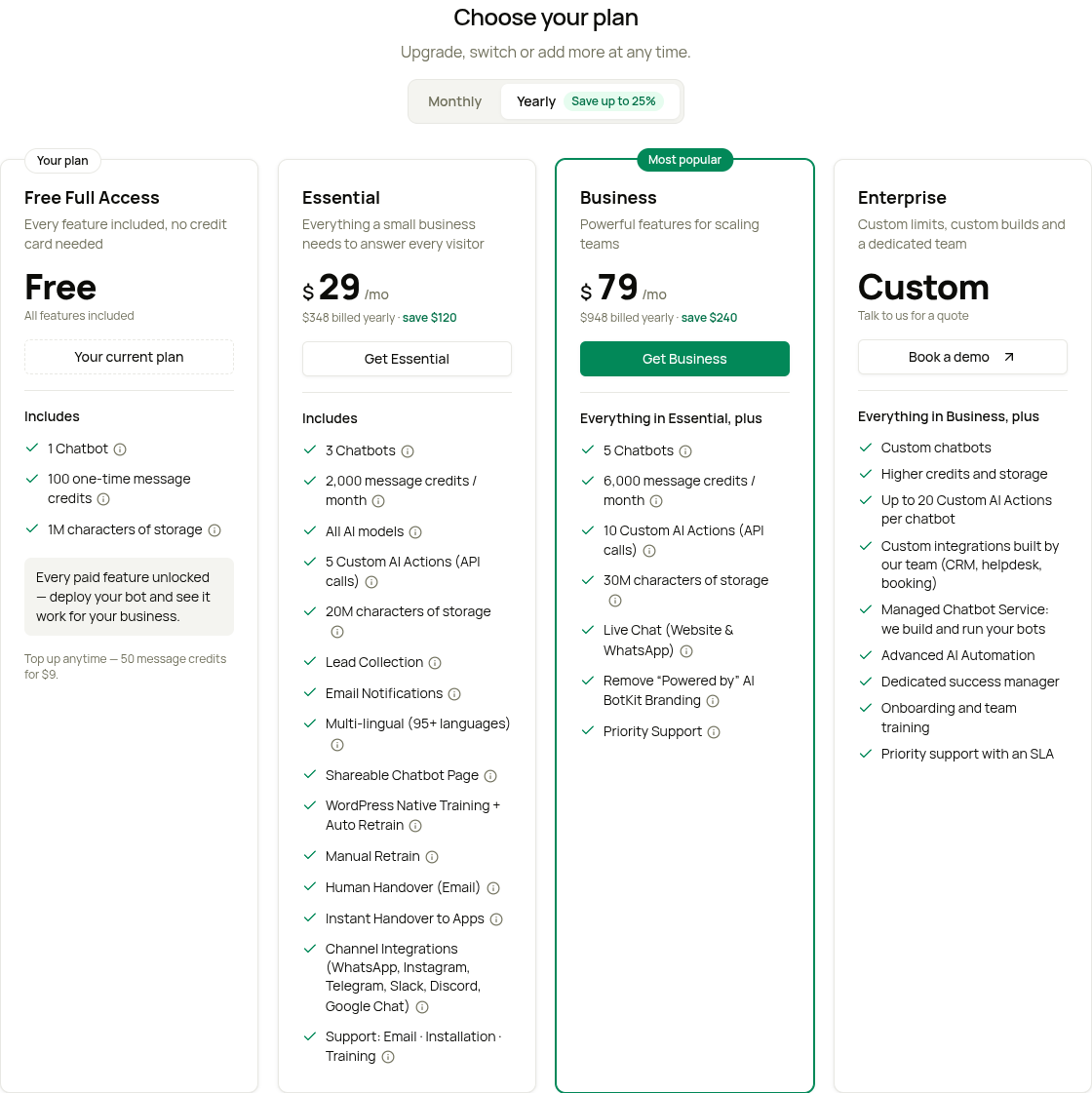
AI Bot Kit has a plan for every stage of your business. Every new account starts on the Free Full Access plan, so you can test the features on your own website first. When you're ready, choose Essential, Business or Enterprise.
You'll find all the plans in your dashboard under Settings → Plans & Billing.
Which plan should I choose?
- Free Full Access — to test the features on your own website.
- Essential — for a small business: 3 chatbots and 2,000 message credits a month.
- Business — when your team wants to reply live in chats or remove the AI BotKit branding, or when you need more: 5 chatbots, 6,000 credits and 10 Custom AI Actions per chatbot.
- Enterprise — for custom limits, integrations built by our team, or a team that builds and runs your chatbots for you.
✅ Free Full Access – Free
Free Full Access turns on the paid features for 1 chatbot, so you can see it work for your business. You don't need a credit card.
- 1 Chatbot
- 100 message credits, one time — they never reset
- 1M characters of storage
- 5,000 web pages to train on, per chatbot
- 5 Custom AI Actions per chatbot
- All channels (WhatsApp, Instagram, Telegram, Slack, Discord, Google Chat)
- Human handover and Live Chat takeover
- Lead capture, the leads table, and lead and transcript emails
- Action buttons, custom footer text, security (banned words, IP blocking), and URL resync / WordPress auto-sync
- Support: bug reports
The "Powered by AI BotKit" line stays on your chatbot on the Free Full Access plan.
Used your credits? Top up 50 credits for $9 or 100 credits for $18 — a one-time purchase, not a subscription — or upgrade to a paid plan. See Add-ons & Message Top-ups.
🔹 Essential – $39/month, or $29/month billed yearly ($348/year)
- 3 Chatbots
- 2,000 message credits a month
- 20M characters of storage (about 8,000 web pages)
- 5,000 web pages to train on, per chatbot
- 5 Custom AI Actions per chatbot
- All channels, human handover, lead capture, action buttons, security, custom footer text, and URL resync / WordPress auto-sync
- Email support, plus help to install and train your chatbot
Essential does not include Live Chat takeover, and the "Powered by AI BotKit" line stays on your chatbot.
🔹 Business – $99/month, or $79/month billed yearly ($948/year) · Most popular
- 5 Chatbots
- 6,000 message credits a month
- 30M characters of storage (about 12,000 web pages)
- 5,000 web pages to train on, per chatbot
- 10 Custom AI Actions per chatbot
- Everything in Essential, plus:
- Live Chat takeover — pause the AI and reply to your visitor yourself
- Remove the "Powered by AI BotKit" branding
- Priority support
🔹 Enterprise – Custom pricing
For larger teams with special needs. Click Book a demo on the Enterprise card and tell us what you need.
- Custom limits for chatbots, message credits and storage
- Up to 20 Custom AI Actions per chatbot
- Custom integrations (CRM, helpdesk, booking) built by our team
- Managed Chatbot Service — our team builds and runs your chatbots for you
- A dedicated success manager, onboarding and team training
- Priority support with an SLA
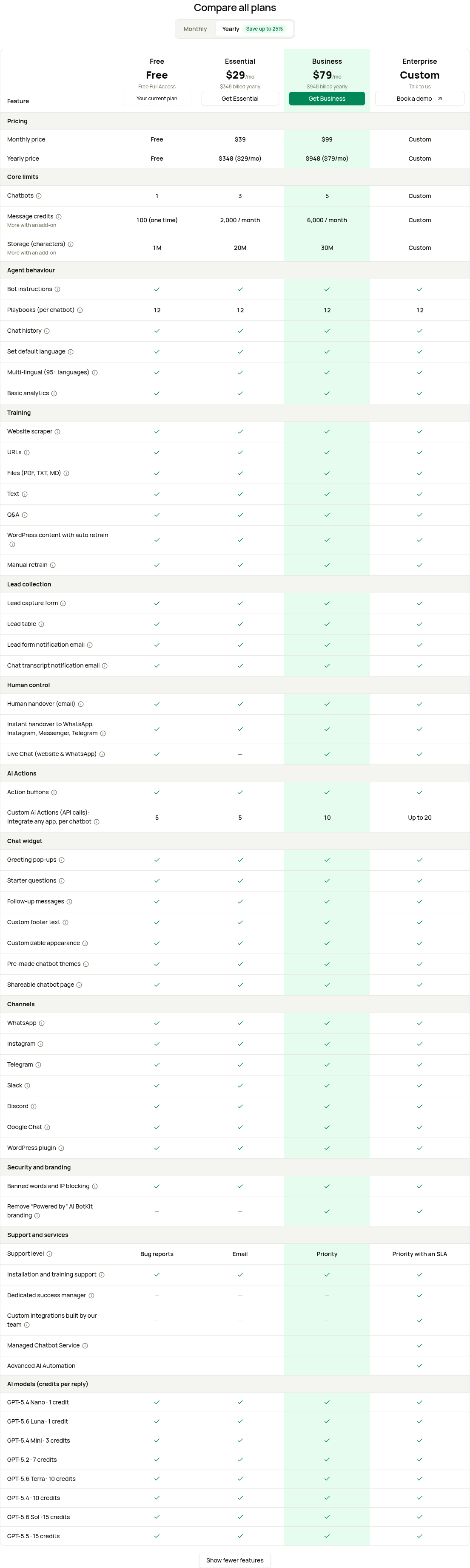
📊 Comparison at a Glance:
To see every feature side by side, scroll to Compare all plans on the Plans & Billing page. The table opens with the main rows — click Show all features to see the rest. On a phone, use the Show plan picker to see one plan at a time.
| Feature | Free Full Access | Essential | Business | Enterprise |
|---|---|---|---|---|
| Price (monthly) | Free | $39/month | $99/month | Custom |
| Price (yearly) | — | $348/year ($29/month) | $948/year ($79/month) | Custom |
| Chatbots | 1 | 3 | 5 | Custom |
| Message credits | 100 (one time) | 2,000 / month | 6,000 / month | Custom |
| Storage (characters, whole account) | 1M | 20M | 30M | Custom |
| Web pages to train on (per chatbot) | 5,000 | 5,000 | 5,000 | Custom |
| Custom AI Actions (per chatbot) | 5 | 5 | 10 | Up to 20 |
| All channels (WhatsApp, Instagram, Telegram, Slack, Discord, Google Chat) | ✓ Yes | ✓ Yes | ✓ Yes | ✓ Yes |
| Human Handover | ✓ Yes | ✓ Yes | ✓ Yes | ✓ Yes |
| Live Chat Takeover | ✓ Yes | ✘ No | ✓ Yes | ✓ Yes |
| Lead Form Notification | ✓ Yes | ✓ Yes | ✓ Yes | ✓ Yes |
| Conversation Transcripts Notification | ✓ Yes | ✓ Yes | ✓ Yes | ✓ Yes |
| Security Features | ✓ Yes | ✓ Yes | ✓ Yes | ✓ Yes |
| URL Resync & WordPress Auto Sync | ✓ Yes | ✓ Yes | ✓ Yes | ✓ Yes |
| Action buttons | ✓ Yes | ✓ Yes | ✓ Yes | ✓ Yes |
| Custom footer text | ✓ Yes | ✓ Yes | ✓ Yes | ✓ Yes |
| Remove "Powered by AI BotKit" branding | ✘ No | ✘ No | ✓ Yes | ✓ Yes |
| Support | Bug reports | Email (+ help to install and train) | Priority | Priority with an SLA, dedicated success manager |
About the "Message credits" row: Free Full Access includes 100 credits, one time — they never reset. Top up or upgrade when you need more. Paid plans include credits that reset each billing month.
Credits & AI Model Choice
A message credit pays for one AI reply. How many credits a reply uses depends on the AI model you choose for your chatbot:
- With the standard AI, one reply uses 1 credit.
- Advanced models use 3–15 credits per reply — they give more capable answers for complex questions.
- When a reply also submits a lead form, hands over to your team or runs a Custom AI Action, it uses 2× the model's credits (2 credits with the standard AI). That is the total for the reply, not extra credits on top.
- Some messages use no credits: the greeting message, your own replies in Live Chat, and messages that Banned Words blocks.
We send you an email when you've used 80% of your credits. At 100%, your chatbot stops replying — buy extra credits or upgrade to start again at once.
You choose the AI model for each chatbot in its Settings. For the full model list and credit costs, see Message Credits & AI Models.
Save with yearly billing
Pay yearly and save 25% on Essential ($29 instead of $39 a month) and 20% on Business ($79 instead of $99 a month). Both monthly and yearly plans include the same features. See Monthly vs Yearly Pricing.
Already a customer on an older plan?
Your plan doesn't change. You keep your current plan, price and limits — the new plans are for new customers. In the app, your plan shows a Legacy plan label.
The Basic plan is no longer sold to new customers. If you're on Basic, or on an older Essential or Business plan, you can stay on it, or move to one of the current plans at any time from Settings → Plans & Billing.