Upgrading to Paid Plans
When you've outgrown the Free Full Access plan, a paid plan gives you more chatbots, more storage, and message credits that reset every billing month instead of the one-time 100 credits. You upgrade directly inside your dashboard.
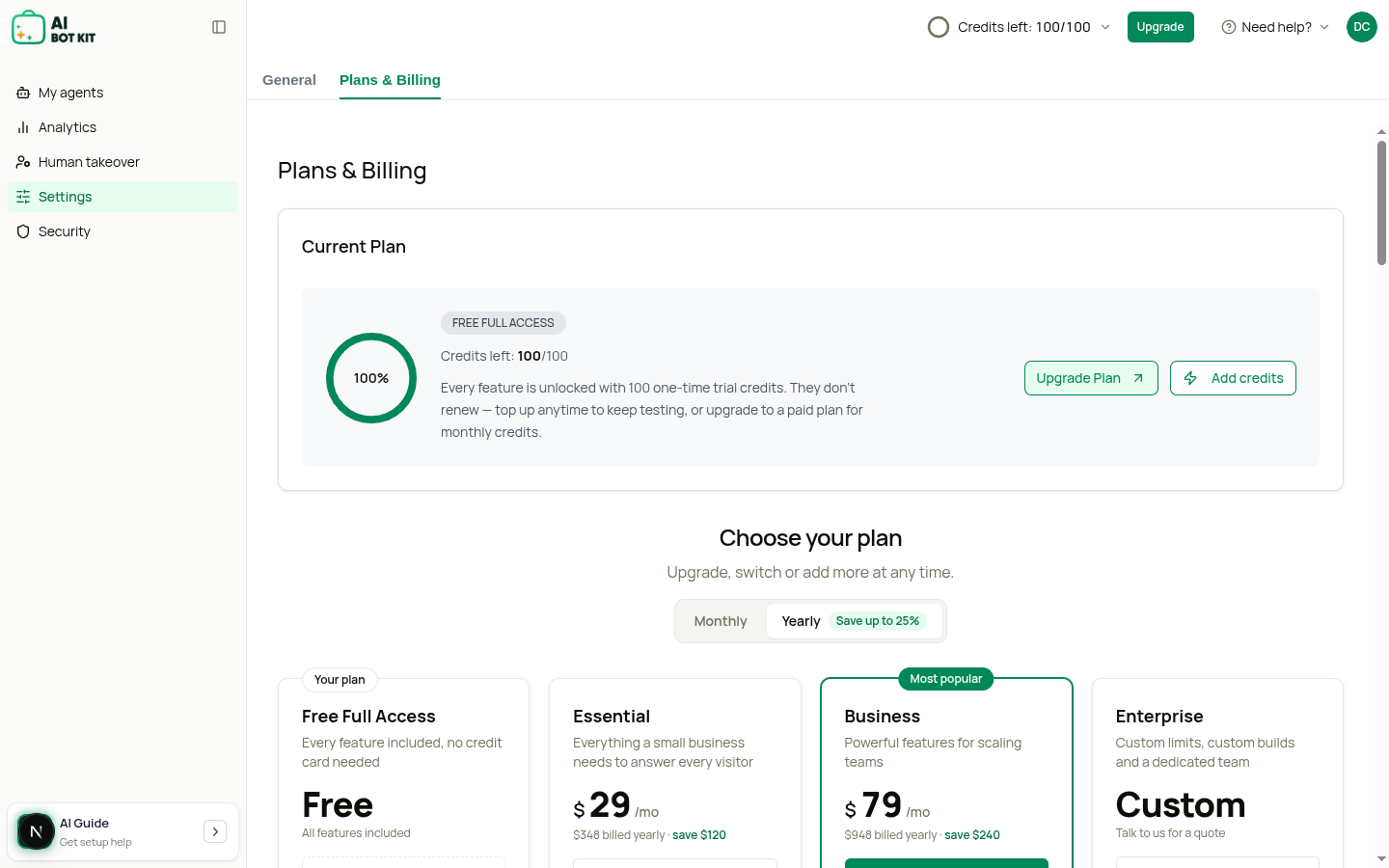
The plans
- Essential — $39/month ($29/month billed yearly). 3 chatbots, 2,000 message credits a month, 20M characters of storage, 5 Custom AI Actions per chatbot.
- Business (Most popular) — $99/month ($79/month billed yearly). 5 chatbots, 6,000 message credits a month, 30M characters of storage, 10 Custom AI Actions per chatbot, Live Chat takeover, and no "Powered by AI BotKit" branding.
- Enterprise — custom pricing and limits. Click Book a demo to talk to us.
For the full list, see Pricing.
How to Upgrade from Free Full Access
- Log into your AI Bot Kit dashboard.
- In the left sidebar, go to Settings, then open the Plans & Billing tab.
- At the top, you'll see your Current Plan box. Click Upgrade Plan to jump to the plans, or scroll down to Choose your plan.
- Use the Monthly / Yearly switch to pick how you want to pay. Yearly saves up to 25%.
- Click Get Essential or Get Business on the plan you want.
- You'll go to a secure Stripe Checkout page. Enter your payment details and confirm.
- You'll come back to the dashboard on your new plan.
For Enterprise, click Book a demo on the Enterprise card instead and pick a time to talk with our team.
Changing plans when you already pay
If you're already on a paid plan, the buttons on the plan cards change:
- Upgrade — move to a bigger plan.
- Switch to Essential — move to Essential.
- Switch to yearly / Switch to monthly — change how you pay for the same plan.
- Your current plan — shown on the plan you're on now.
These buttons open Stripe's billing page, which shows you the exact amount and date before you confirm.
What Happens After Upgrading?
- Your new plan's chatbot, credit and storage limits apply, and your credits switch from a one-time balance to credits that reset each billing month.
- Your existing bots and their settings stay — nothing gets deleted.
- You'll see your new plan under Current Plan on the Plans & Billing page.
Free Full Access includes Live Chat takeover. Essential does not. If you move from Free Full Access to Essential, Live Chat takeover is switched off. Choose Business if your team wants to reply live in chats.
Payment Options
- You can pay monthly, or save by paying yearly.
- Yearly plans are billed once a year, up front. Yearly saves 25% on Essential and 20% on Business.
| Plan | Monthly | Yearly (per month) | Yearly Total |
|---|---|---|---|
| Essential | $39/mo | $29/mo | $348/year |
| Business | $99/mo | $79/mo | $948/year |
| Enterprise | Custom | Custom | Custom |
Cancelling
You can cancel from Settings → Plans & Billing. Your plan stays active until the end of the period you've already paid for.
Example
- You're on the Free Full Access plan (100 one-time credits, 1M characters of storage, 1 chatbot).
- You've used most of your 100 credits and want credits that reset every month.
- You click Get Essential.
- Once you've paid, you get 2,000 message credits a month, 20M characters of storage, and up to 3 chatbots.
Already on an older plan?
If you're on Basic, or on an older Essential or Business plan, your plan, price and limits stay the same. Your plan shows a Legacy plan label. You can move to one of the current plans at any time from Settings → Plans & Billing.
⚡ Tip: Keep an eye on your usage on the Plans & Billing page. If you keep running out of credits or storage, upgrading — or adding an add-on — keeps your chatbot replying.