Free Full Access Plan
Everything included in the Free Full Access plan — the free plan every new AI Bot Kit account starts on — plus how one-time credit top-ups work.
Every new AI Bot Kit account starts on the Free Full Access plan. It turns on the paid features for 1 chatbot, so you can build your bot, connect your channels, and see it work for your business — all before you spend a cent. You don't need a credit card.
What's Included
| What you get | Free Full Access |
|---|---|
| Chatbots | 1 |
| Message credits | 100, one time (they never reset) |
| Storage | 1M characters |
| Web pages to train on (per chatbot) | 5,000 |
| Custom AI Actions (per chatbot) | 5 |
| Paid features | ✓ Turned on |
| "Powered by AI BotKit" line | Stays on |
| Support | Bug reports |
| Credit card required | No |
What you can use
While you're on Free Full Access, you can use:
- Knowledge — website scraping, file uploads (PDF, TXT and MD, up to 20 MB each), text, Q&A, WordPress content, plus URL resync and WordPress auto-sync
- Lead management — lead capture forms, the leads table, lead emails and conversation transcript emails
- Channels — WhatsApp, Instagram, Telegram, Slack, Discord, and Google Chat
- Human handover — email form and instant handover to WhatsApp, Instagram, Messenger or Telegram, and Live Chat takeover
- Automation — up to 5 Custom AI Actions per chatbot, and action buttons
- Customization — welcome screen, starter questions, follow-up messages, custom footer text, themes, and appearance
- Security — banned words and IP blocking
What Free Full Access doesn't include: you can't remove the "Powered by AI BotKit" line — that needs the Business or Enterprise plan. And your 100 credits are one time; paid plans give you more credits that reset every billing month.
How the 100 Credits Work
- The 100 credits are a one-time allowance — they are not a monthly quota and never reset.
- A message credit pays for one AI reply. With the standard AI, one reply uses 1 credit; advanced models use 3–15 credits per reply. See Message Credits & AI Models for details.
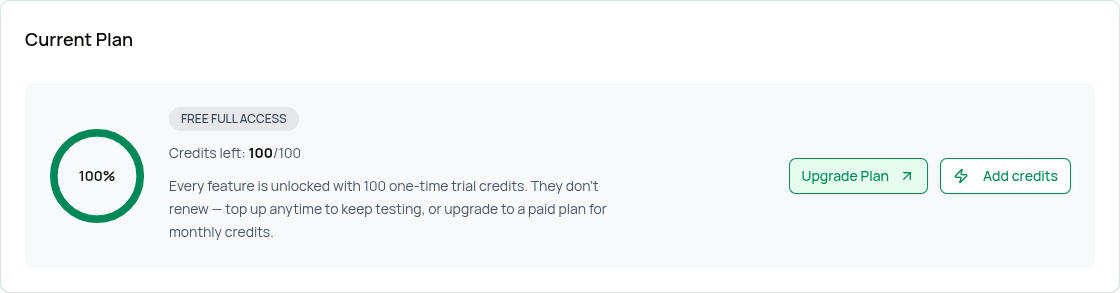
- You can see your balance any time on the Plans & Billing page and in the top header. For example, "Credits left: 100/100" means you haven't used any yet.
- We send you an email when you've used 80% of your credits. At 100%, your chatbot stops replying until you top up or upgrade.
Adding More Messages (One-Time Top-Ups)
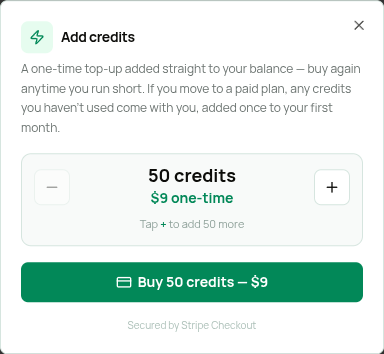
If you run low before you're ready to upgrade, you can buy a one-time top-up. A top-up is a single card payment (not a subscription) and is added straight to your balance — buy again whenever you need to.
| Top-up | Price |
|---|---|
| 50 credits | $9 (one time) |
| 100 credits | $18 (one time) |
How to Top Up
- Log into your AI Bot Kit dashboard.
- Go to Settings → Plans & Billing.
- In the Current Plan box, click Add credits.
- Use the + / − buttons to choose 50 credits ($9) or 100 credits ($18).
- Click Buy 50 credits — $9 (or Buy 100 credits — $18). You'll be taken to a secure Stripe Checkout page.
- (Optional) Have a coupon? Enter it in the Add promotion code box on the Stripe Checkout page.
- Pay by card. You'll be returned to the dashboard and your new credits are added automatically.
Coupon codes are supported. On the Stripe Checkout page you'll see an Add promotion code field — enter a valid code there to discount your top-up before paying.
Top-ups are only for the Free Full Access plan. On Essential and Business, use Add-ons to add more credits or storage.
Upgrading From Free Full Access
Ready for more chatbots, or credits that reset every month? Click Upgrade Plan in the Current Plan box, or scroll to Choose your plan, and click Get Essential or Get Business. See Upgrading to Paid Plans.
- Your bots and their settings are kept.
- Your credits switch from a one-time balance to credits that reset each billing month.
- Any credits you haven't used come with you — they're added once to your first month.
- Features follow the plan you choose. For example, Essential doesn't include Live Chat takeover, so choose Business if your team wants to reply live in chats or remove the AI BotKit branding.
FAQs
Do my 100 free credits refill each month? No. They're a one-time allowance. Top up or upgrade for more.
Can I really use paid features for free? Yes — Free Full Access turns on the paid features for 1 chatbot. You're limited by the 100 one-time credits and the plan limits (1 chatbot, 1M characters, 5,000 web pages per chatbot, 5 Custom AI Actions). The "Powered by AI BotKit" line stays on.
Is a credit card required to start? No. You only enter payment details if you buy a top-up or upgrade to a paid plan.
Can I apply a coupon to a top-up? Yes. Enter it in the Add promotion code field on the Stripe Checkout page.
Related Topics
- Pricing — All plans and the feature comparison
- Add-ons — One-time top-ups (Free) and add-ons (paid plans)
- Where to Find Your Usage — Track your credit balance
- Upgrading to Paid Plans — Move to a paid plan