Where to Find Your Usage
AI Bot Kit makes it easy to track your plan usage directly inside the dashboard. This ensures you always know how many credits, chatbots, and storage characters you’ve used, and when you may need to upgrade.
Current Plan Overview
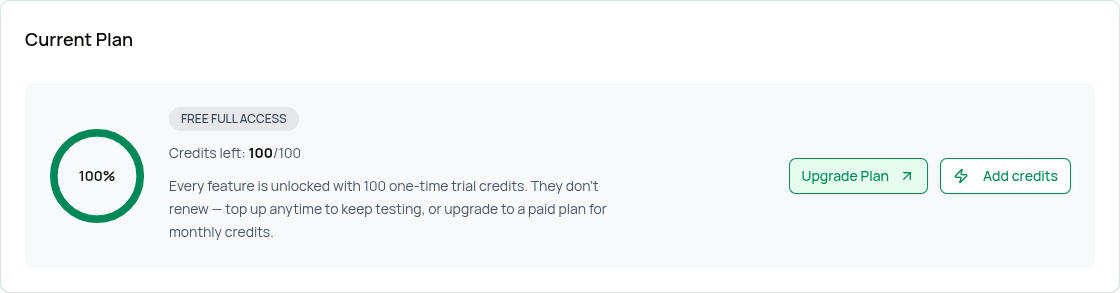
Go to Settings → Plans & Billing. At the top of the page, you'll see your Current Plan box. This shows:
- Plan name → for example, Free Full Access, Essential or Business. If you're on an older plan we no longer sell (such as Basic), you'll also see a Legacy plan label — your plan, price and limits stay the same.
- Credits left → for example, "100/100" means you still have all 100 of your credits
- Credit usage meter → a circular indicator of how much of your allowance remains
The same "Credits left" meter also appears in the top header, so you can keep an eye on it from anywhere in the dashboard.
Free Full Access vs. paid plans: Your Free Full Access 100 credits are one time — they never reset. When you run low, click Add credits to top up. On paid plans, your credits reset every billing month and the box also shows your renewal date. How many credits each reply uses depends on your chatbot's AI model — see Message Credits & AI Models.
When to Upgrade
You’ll know it’s time to upgrade when:
- You get our email saying you've used 80% of your credits. At 100%, your chatbot stops replying until you get more credits or upgrade.
- Your storage usage gets close to the maximum.
- You want to create more chatbots than your plan allows.
⚡ Tip: On Essential or Business, if you only need more credits or storage, an add-on is a quick alternative to upgrading. On Free Full Access, if you only need more credits (not more bots or storage), a one-time message top-up is a quick alternative to upgrading. You can also switch to a lower-cost AI model to make your credits last longer — see Message Credits & AI Models.